
Lock your apps. Earn them back.
Your most distracting apps get locked. Your habits unlock them, a few minutes at a time.



How it works.
No willpower required. The lock does the work.
Your apps get locked
Pick the apps that steal your time with Apple's Screen Time picker. They stay shut until you've earned them.
Your habits unlock them
Fast +30Workout +30Calories +30Clean day +15Water +15Minutes are metered while you scroll, and reset at midnight.
Your time turns into progress
Wins where the scrolling used to be: fasts finished, workouts logged, streaks alive, weight moving.
Every habit is a key.
Every habit you complete earns screen time. Turn on the ones you care about, leave the rest switched off.
Fasting
Set a 16:8 window or write your own schedule, then watch a live timer count it down. Finishing it earns 30 minutes.
NoFap
Check in every day to keep the streak alive. Slip, log it honestly, and start again. A clean day earns 15 minutes.
Workouts
Log a session and get a calorie burn estimate. Your steps count toward the day too. A workout earns 30 minutes.
Nutrition
Every meal, calories and macros, logged in seconds and editable down to the ingredient. A day on target earns 30 minutes.
Hydration
Set a daily target and log a glass or a bottle in one tap. Reaching it earns 15 minutes.

AI meal scanning
Point your camera at dinner.
The AI reads the plate and gives you calories, protein, carbs and fat, broken into ingredients you can correct line by line.
- Scan a meal, or just describe it in a sentence.
- Scan a nutrition label or a barcode.
- Edit the total and the ingredients rescale to match.
Progress over time
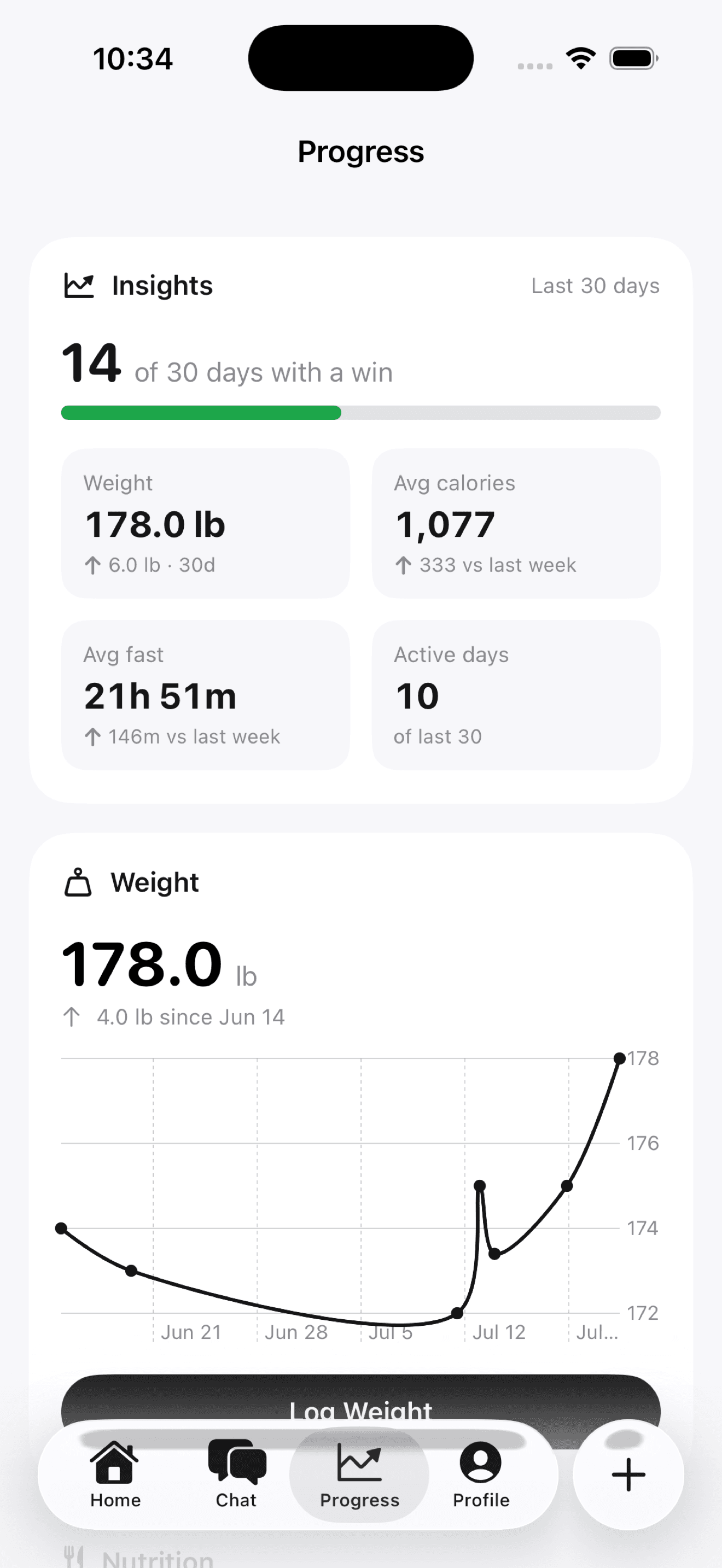
Watch the line move.
Weight, fasting hours, workouts, calories and water charted over weeks, so you are reading a trend instead of one bad day.
- Log your weight in a tap, once a day.
- Insights: days with a win, averages, active days.
- A daily trend chart for every habit you track.

Group chat
Bring someone with you.
Start a group, share the invite link, and keep each other honest. Nobody sticks to anything alone.
- Invite by link. One tap opens the app.
- A leaderboard ranks the group by current streak.
- React to messages and see the day's progress.
From the App Store.
 Jahrai Haile
“This app motivates me to want me to get better. The app is so simple and organized and easy to navigate. It keeps me and my screentime in check.”
 Marina Vespan
“I used a couple different habit-tracking/health apps before and having everything in one place is definitely a big plus. I mainly use it for the chats and being able to share progress with my friends so we keep each other accountable. Scanning meals also works great and is more accurate than other apps I’ve tried.”
 Daniel Trinca
“I like using the app, the group chats definitely help you stay accountable. There are some issues though I’d like it to be easier to edit portion sizes manually without ai”
Questions, answered.
How does locking apps work?
You choose the apps with Apple's Screen Time picker, and Be Serious keeps them shielded. Completing a habit earns minutes, the clock runs only while you're actually inside a locked app, and at midnight the balance resets and the lock returns. Which apps you pick never leaves your phone.
Do I have to lock apps?
No. Locking is optional. Skip it and Be Serious works as a straight tracker, and you can turn the lock on any time from the home screen.
What happens if my subscription ends?
Everything unlocks automatically. The lock only runs while your subscription is active, so your phone is never held hostage.
Is there a free trial?
Some plans start with a free trial, and you pay nothing if you cancel before it ends. Either way Be Serious is a subscription, billed through your App Store account, and you can cancel any time.
How do I cancel?
Any time, in your iPhone's settings: Settings, your name, Subscriptions. Apple handles the billing, so cancelling works even after you delete the app.
Is Be Serious on Android?
Not yet: it's built for iPhone, iOS 18 or later. Leave your email in the updates box below and you'll hear if that changes.
What happens to my meal photos?
A scan sends the photo to our AI provider once, to estimate calories and macros; no server-side copy of the scan is kept and your photos are never used to train AI models. A photo you attach to a logged meal is stored in a private bucket only your account can read. The app never reads your photo library.
Do I need friends on the app?
No, everything works solo. The lock, the habits and the tracking need nobody else. Group chat is there when you want backup: start a group, share one invite link, and keep each other honest.
Do I have to track every habit?
No. Turn on the ones you care about and leave the rest switched off. Most people start with one or two.
Stop negotiating with yourself.
The apps that waste your time stay locked until your habits are done. Starting today.
Subscription app. Cancel any time.